Things to Know Before Registering Online
Before starting the online registration process, make sure you have the following available:
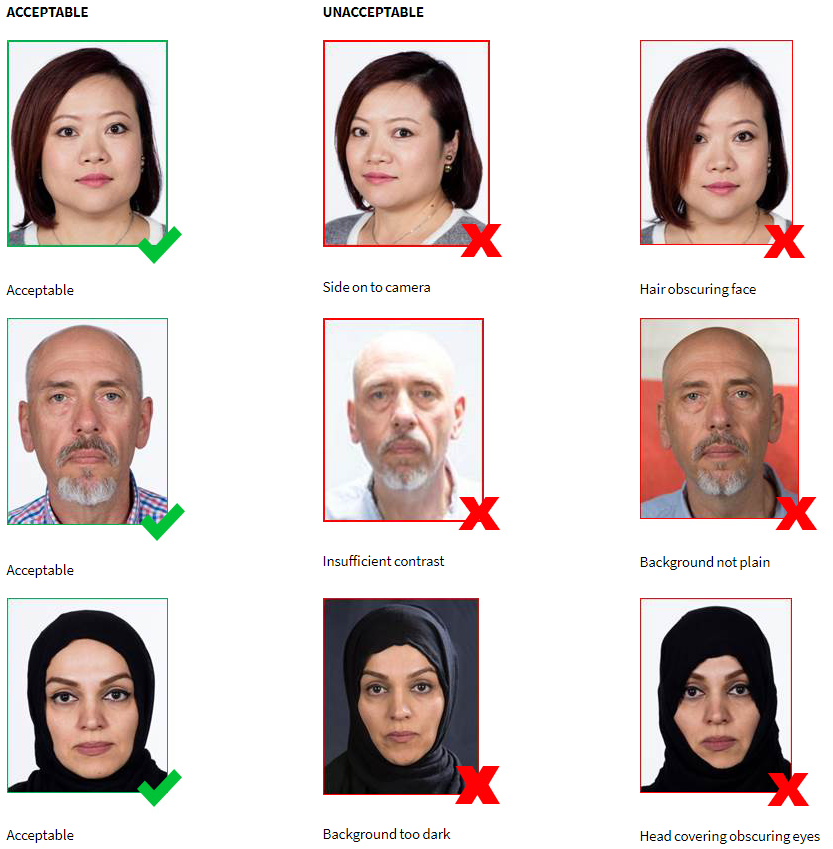
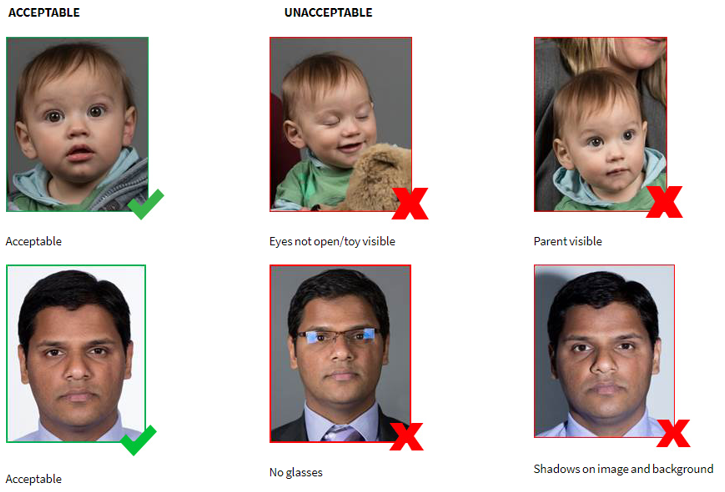
* Photo – everybody must upload a photo and the photo must be passport-style [i.e. a plain, light-coloured, untextured, background required (e.g. internal wall), head & shoulders only, no caps/hats/sunglasses/glasses (unless sports glasses are worn when playing)]. DO NOT take a photo of a photo – your registration will not be approved.
Have a look at the images in this post for what’s OK and what’s not. If no photo is uploaded, or the uploaded photo is not passport-style, then your registration cannot be approved until this is done. If you encounter any problems when uploading a photo, please send it to Play Football, together with the player’s full name and FA number, and c.c. in registrar@bmfc.com.au, so we can try to keep track of the request. PlayFootball Support email (support@playfootball.com.au) or phone (02) 8880 7983 and choose option “1”.
* Sibling Discount voucher code, as issued by our Registrar. Please contact him (registrar@bmfc.com.au) to get one, but only if two or more siblings are under 18 years of age.
* Active Kids Voucher details, if using one.
* Working With Children (WWC) details (applicable to all coaches, managers & marshals, except those in “Over” teams).
Minimum Age to register – turning 5 this year. Junior players register by their AGE (which may not necessarily be the age group of the team they will end up playing in – see next point).
Default age group to play in (for junior players) – the age the player is turning this year (e.g. a child who is 7, as at 31 December, will play in Under 7s). If a player wishes to play up a year, please indicate this in the relevant question when registering online.
Once you’re ready to register online, go to: https://registration.playfootball.com.au/participant/find-products?referrer_entity_id=74257&page=1